Contents
Overview
MRedoc ( Modular Reduced Documentation) is a minimal library for generating HTML and LaTeX documents containing text, equations, figures and tables from Python. It was built as part of Mike Hull’s Ph. D in computational neuroscience, which involved running many simulations, using different mathematic models, parameters and results. This simulations can quickly become unmanagable without an easy way to store the simulation setups with results. After hacking together one-too-many scripts to generate LaTeX/HTML, I decided to separate it out into a separate python module I could reuse.
It is designed as a simple interface for generating summaries of simulations of models in computational neuroscience; often models contain many parameters and are controlled by a variety of non-trivial equations. MReDoc contains a simple set of primitives for documenting mathematical models. It is more aimed as an API for auomatically documenting simulations; if you are looking to build pdf/html documentation for a specific project, you might be better off with sphinx.
Although other libraries, (e.g. Reportlab, Sphinx), have more comprehensive APIs for, for example, font customisation, page layout, MRedoc is more focused on a simple set of objects that can be simply embedded within each other and easily produce high quality output. It was designed to allow decoupled components to each generate out different parts of a report. It allows easy embedding of matplotlib graphs, LaTeX style equations, syntax highlighted code snippets, tables and more into (LaTeX) pdfs and HTML documents.
It is a work in progress; if you use it, and find things you like, or dislike, I am more than happy to incooperate suggestions.
Example
The following shows how to create a simple document with some text, a figure from matplotlib and a table:
It will produce this pdf file and this html file
Installation
Requirements
I have only tried it on Linux. There is no reason it shouldn’t run on other operating-systems, but the paths will need to be set properly, and I don’t know about ImageMagick/LaTeX setups on Windows/Mac. (I am happy to help if someone wants to look into this). Most of the dependancies are soft, but if you want to run the examples you will need to install the following:
- matplotlib
- A LaTeX installation (pdfLatex is used by mredoc to build the docs)
- ImageMagick (used for converting images for HTML using the commandline tool convert)
- A network connection (HTML formula are displayed using mathjax)
License
mredoc is released under the BSD 2-clause license. Please see LICENSE.TXT for more information. You are free to use the software as you wish, but if you find it useful, please contribute changes back to the project.
Installation
mredoc is available on github at: https://github.com/mikehulluk/mredoc To install, clone the repository, and add the ROOT_DIR/src/ folder to your python-path. (I have not written a setup.py, this is on the ‘todo’ list....)
Acknowledgments
- The xml-witch library is used to write HTML. I have taken the library and modified it slightly to resolve some white-space issues. I would highly reccommend checking out this project if you are writing XML/HTML using python. Many thanks to Jonas Galvez for this!
- mathjax is a service that renders LaTeX style strings in HTML as nice-looking formulae. This project makes it very simple to make sleek looking HTML pages. Many thanks for a great service!
API
Sections & ContentBlocks
- A Document is a tree of made of Sections and ContentBlocks.
- ContentBlocks contain content; There are 6 types of blocks; Figure, Table, Listing, Equation, List and Paragraph.
- Sections contain sub-Sections & ContentBlocks; they represent the hierachical structure of the document.
A Document is a tree of elements. It is possible to create different parts of a document in different parts of the program, and combine them at the end into a single document. Once the tree has been built, it can be converted to PDF or HTML using the methods to_pdf() or to_html().

A Document contains a hierachy of Sections and Blocks. The Document points to a single Section. Sections can contain ContentBlocks and chidren-Sections. ContentBlocks contain content, for example Figures, Equations and Text.

The ContentBlock types
RichText
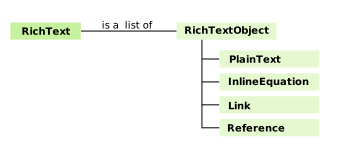
Often we want to use RichText, in which we have equations text and hyperlinks all inline in a sentence, rather than individual blocks. This requires that our paragraphs can contain more than just text and is handled in mredoc using the RichTextContainer. RichTextContainer objects can contain:
- Text
- Inline equations
- Internal Reference (e.g. ‘see Figure 2’)
- Exteral Links
Normalisation & Empty Section Removal
By default, mredoc will automatically normalise all headings within sections. This means that you can be quite relaxed about the document structures; (how headings and sections are defined) and everything should ‘just work’. It will also remove empty sections or those containing simply a header. This allows functions that return summary objects to be quite flexible.
Object API
Basic Object Construction
MReDoc’s API is designed to be simple to use as possible. It is quite relaxed about the parameters which can be passed to various constructors, and will try to do TheRightThing. Although the internal object representation is quite strict, passing a string or a matplotlib figure directly to the constructors in the object model will automatically. The following are the most commonly used objects:
References and links can be used for cross-referencing.
mredoc is designed for libraries rather than end-users, so its API is designed in terms of objects rather than strings (in constrast with Sphinx for example). However, it does allow Sphinx-like markup; it will automatically break long text strings into RichTextObjects references
Todo
A nice example of this...
Creating HTML and .pdf output:
HTML and Latex output can be created by calling to_pdf or to_html on any mredoc object.
Other functions:
Sometimes useful are: